Choose how much flowmo should direct, start the correct deliverable with model and design-system context, and change an individual project without rewriting the account preference.
Where: Dashboard → “How do you wanna work?” or the current start composer.
Key ideas
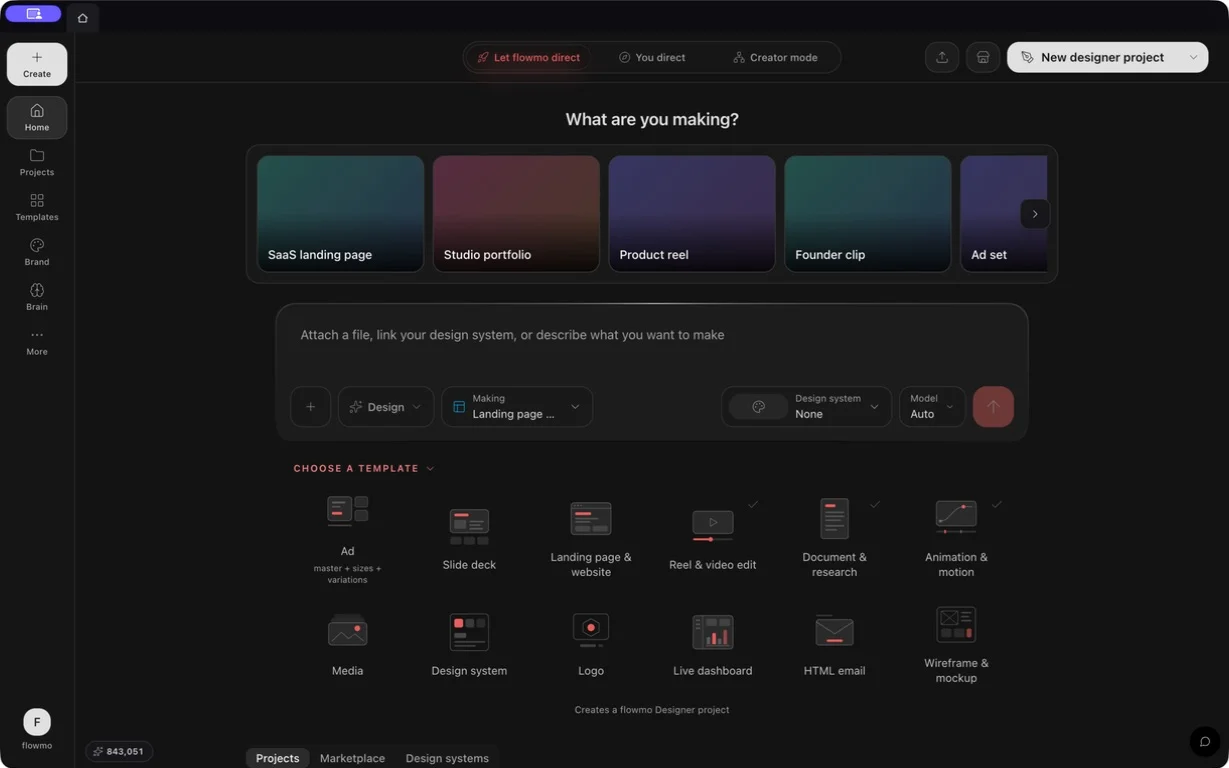
- Three account work modes: Let flowmo direct emphasizes an outcome brief and a Designer-first shell; You direct exposes eight visual outcome cards; Creator mode keeps the full project-management dashboard. Internally these are stored as autopilot, assist, and control. The preference changes dashboard presentation, not project ownership or document format.
- Two ways to direct a start: “Let flowmo direct” accepts the goal and can choose among all twelve Designer page types. “You direct” presents eight explicit start cards: Slides, Ads, Brand images, Immersive webpage, Studio portraits, Motion, Video, and Design system.
- Account preference versus project chrome: The account mode is not the old single simple/advanced switch. Each project can independently override its f0 editor chrome and Flowgen chrome, so a direct canvas can stay advanced while another project remains compact.
Steps
- Choose Let flowmo direct, You direct, or Creator mode from the dashboard switch. You can change this later without converting existing projects.
- Use Let flowmo direct when you want the brief to determine the deliverable, or You direct when you already know the output type. Choose Creator mode for the complete folder/filter/sort/grid-list project-management surface.
- Enter a useful brief where the selected mode offers one. Add files before creation when they are part of the source, and choose a Brain item or Design system when the project should inherit that context.
- Review the model, reasoning/mode, media-kind, and estimated price controls that appear for the selected start. Premium badges describe a paid capability; the actual eligibility/spend gate happens at creation or use.
- Create the project. If no paid model run is required, the project can be created without charging for a generation round.
- Inside a project, change its f0 or Flowgen surface preference when needed; do not switch the whole account merely to expose one project’s advanced controls.
You direct choices
- Slides
- Ads
- Brand images
- Immersive webpage
- Studio portraits
- Motion (premium)
- Video (premium)
- Design system
Let flowmo direct page types
- Landing page & website
- Reel & video edit
- Ad
- Slide deck
- Animation & motion
- Document & research
- Wireframe & mockup
- HTML email
- Live dashboard
- Logo
- Media
- Design system
Start context that survives creation
- Prompt/brief and uploaded source files
- Chosen language or generation model and effort/mode
- Media kind and relevant generation settings
- Pinned Brain and Design system context
- Selected preset/template and supported seeds
Tips
- Choose Creator mode because you want the full project-management surface, not because it produces inherently better AI output.
- Upload references before creating the project when the first build must use them; adding them later requires a separate revision.
Limitations and important notes
- The start cards are not promises that every account can run every paid model. Plan and Sparks checks occur at the action that spends.
- Changing dashboard mode does not rewrite a project, migrate its page types, or rerun its content.
- Per-project editor chrome changes available controls, not the document’s semantic type.
Troubleshooting
A premium start is visible but creation asks for a plan.
The crown identifies a paid workflow; choose a suitable plan or start a non-generating/manual project where supported.
Changing the account mode did not change one open project’s view.
That project may have its own override. f0Chrome and flowgenChrome are user defaults; per-project surface keys win over them.