Start Flowgen with Build with AI, eight visual starts, or Marketplace. Designer start opens this same Flowgen canvas in Designer presentation mode—it is not a separate project type.
Where: Dashboard → New Flowgen project → empty Flowgen canvas.
Key ideas
- Build with AI: Describe the result in Flowgen chat and collaborate with the Agent on a plan and connected nodes. Review its cost before paid work.
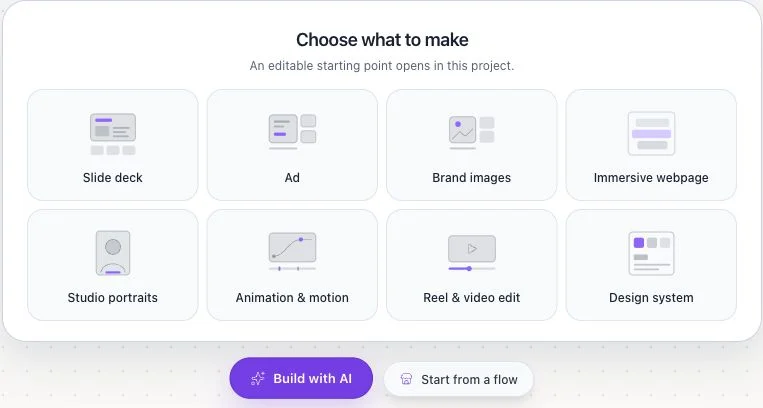
- Eight editable starts: A truly empty canvas offers Slide deck, Ad, Brand images, Immersive webpage, Studio portraits, Animation & motion, Reel & video edit, and Design system.
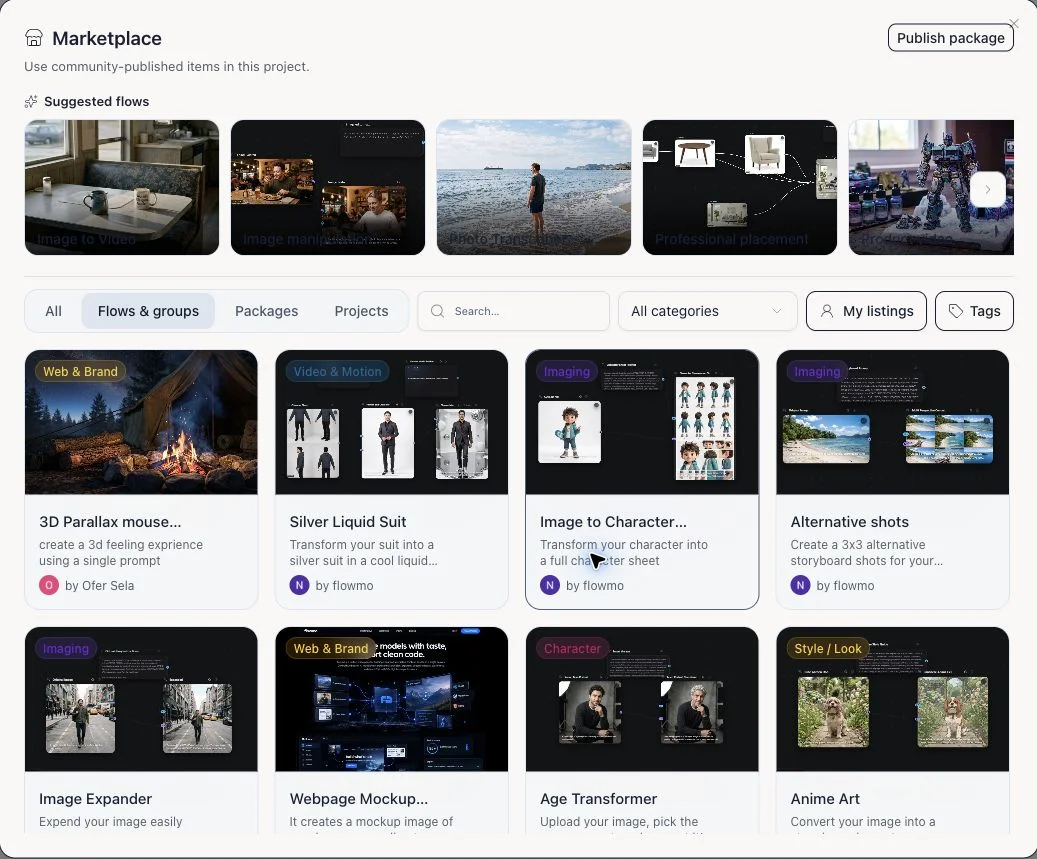
- Marketplace flows: Start from a flow opens Marketplace. Inspect its structure and terms before adding it to your project and customizing its inputs.
- Designer is a canvas presentation, not a project type: The Dashboard Designer action creates the same media-gen/Flowgen project and opens its canvas in Designer presentation. Flow and Designer show the same graph, conversation, and connected sources.
- Editors are stages, not an onboarding choice: Designer-node, website, video, and compositor editing can open from supported Flowgen nodes while the canvas keeps inputs and outputs connected. A Designer-node document is distinct from the canvas presentation.
Steps
- From Dashboard, create a new Flowgen project. The eight cards are visible when its canvas has no nodes.
- Choose Build with AI for a conversational brief; use the Agent to plan and make connected changes, checking the quote before paid execution.
- For a prepared visual start, choose one of the eight cards. The choice adds editable nodes inside this Flowgen project, not a standalone project.
- For a reusable workflow, choose Start from a flow. Browse Marketplace, inspect the flow and any terms, then add it to the canvas and replace its example inputs.
- Use Add or the Agent to extend the graph. Connect noodles to the exact named input fields and select a node to inspect card and sidebar options.
- If you chose Designer from Dashboard, switch between Flow and Designer presentations on the same canvas; you are still in the same Flowgen project.
- Open a Designer-node document, website, video, or compositor editor from its node when direct editing is needed; return to Flowgen to inspect downstream results.
- Run the smallest branch needed, inspect outputs, then choose share, export, or publish as distinct deliberate actions.
All eight starts
- Slide deck
- Ad
- Brand images
- Immersive webpage
- Studio portraits
- Animation & motion
- Reel & video edit
- Design system
Which entry should I use?
- Use chat when you know the outcome but not the graph.
- Use a starting card for a quick editable visual artifact.
- Use Marketplace when an existing flow already resembles your workflow.
- On a non-empty canvas, use Add, Agent, or Marketplace; the eight-card landing state is intentionally hidden.
Do not confuse these Designer surfaces
- Designer presentation is a view of a Flowgen canvas.
- A Designer node opens a native Designer document editor.
- Legacy standalone Designer project/document routes remain for compatibility.
- Page kinds such as deck, ad, graphics, and motion describe pages inside a Designer document; they are not top-level Dashboard project types.
Advanced project lifecycle
- A supported node can be promoted to a separate Dashboard project when independent ownership or sharing is needed.
- The New Project chevron keeps direct Website and Video editor starts available; Designer opens a Flowgen canvas in Designer presentation.
- Older standalone Designer records remain accessible for compatibility, but are not the normal new-project path.
- Account and project view preferences change editing chrome, not the underlying Flowgen work.
Tips
- The fastest first choice is the one that matches your starting material; all three remain in Flowgen.
- Keep reusable Brand context in linked Brand fields and task wording in connected Text sources.
Limitations and important notes
- The eight starting cards appear only on a truly empty Flowgen canvas; they disappear once work is added.
- A Marketplace listing may require access or purchase, and inserting a flow does not authorize running its paid nodes.
- A visual start and its editor-backed nodes remain in this Flowgen project unless you deliberately promote a supported result.
Troubleshooting
I do not see the eight starting cards.
Open a new, empty Flowgen canvas. On an existing canvas, use Add, Agent, or Marketplace instead.
I chose Start from a flow but nothing was inserted.
Browsing Marketplace does not add a flow by itself. Open a listing, check access and terms, then choose its add/use action.