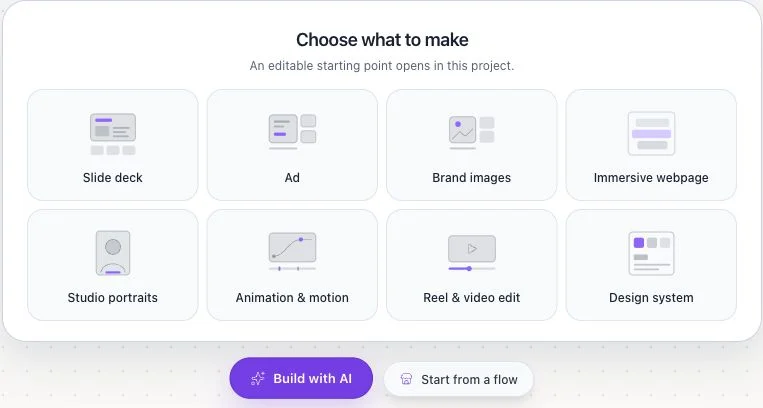
A new Flowgen canvas shows eight “Choose what to make” choices alongside Build with AI and Start from a flow. Pick an editable starting point or browse Marketplace without choosing another project type.
Where: Dashboard → New flowgen project → empty canvas — Choose a visual start or select Start from a flow
Key ideas
- Eight visual starts: The empty canvas offers Slide deck, Ad, Brand images, Immersive webpage, Studio portraits, Animation & motion, Reel & video edit, and Design system. Each opens an editable starting point in this Flowgen project.
- Build with AI: Use the adjacent button when you want to describe the outcome in the Agent conversation and let it ask for missing details.
- Marketplace flows: Start from a flow opens Marketplace browsing. Review the listing and any access or purchase requirements before using it in the current canvas.
Steps
- Create a new Flowgen project from the Dashboard and wait for its empty canvas to load.
- Choose one of the eight “Choose what to make” cards if the deliverable matches. The result opens here as editable Flowgen work.
- Alternatively, select Build with AI for chat or Start from a flow to browse Marketplace; inspect a flow before adding it.
- Review the added nodes, Brand and media inputs, connections, and Flowie quote before running a paid operation.
Current Dashboard and Flowgen start
The Dashboard starts with a guided outcome prompt. A new Flowgen canvas offers three other entry actions in one workspace: Build with AI, eight editable visual starts, and Start from a flow in Marketplace. Website, video, and Designer editors can then open from connected Flowgen nodes.
- Describe a goal under “What would you like to make?”; add relevant references and choose or skip a Brain Brand before the guided Flowgen handoff.
- Use New flowgen project for an empty canvas. Its eight “Choose what to make” cards live on that canvas, not as a required Dashboard mode choice.
- Build with AI opens the Agent conversation; Start from a flow browses Marketplace work for the same canvas.
- Dashboard project search, filters, sort, grid/list, folders, Archive, and Trash help you manage existing work.
- Focus/Studio and Cards/Node graph change editor presentation for an existing project; a premium action is gated and priced when it runs.
Related guides
- Flowgen-first: canvas, flows, websites & videos
- Discover Marketplace items from Dashboard and Flowgen
- Your first Flowgen task: brief, references, and optional Brand
- Start from the Dashboard: describe your goal, open Flowgen, or use Marketplace
- Dashboard interface: guided start, projects, Brain, Assets, and Marketplace
- Editor view preferences: user defaults and per-project f0 and Flowgen overrides
- Designer projects, pages, promotion, and the Flowgen round trip