Follow the Dashboard goal prompt into one guided Flowgen task. Attach useful references, create or connect a Brand only if needed, and understand the Agent and asset cost boundaries.
Where: Sign in to an empty Dashboard, or choose the guided “What would you like to make?” entry.
Before you start
- Have a flowmo account. Keep any brand website, images, documents, or written references you want to use nearby.
Key ideas
- The goal comes first: First use may show a welcome, then the Dashboard asks “What would you like to make?”. Its example ideas are prompts, not competing project types.
- References and Brand enrich one brief: The guided brief accepts a website, file, image, recording, or notes. Create a Brand, connect a Brand from Brain, or skip it; the outcome still opens in Flowgen.
- The task stays with its Flowgen project: Start creating creates a Flowgen project with a saved Agent task. Reopen the project later to inspect its conversation, canvas, nodes, and results.
- Costs have distinct boundaries: The bounded first Brand draft and manual Brand edits are free. Starting the guided Agent conversation is paid from its first AI step; generated assets have separate quotes.
Steps
- On the Dashboard, choose “Describe what you have in mind” under “What would you like to make?”. A first-use welcome may appear beforehand.
- Write the result you want. The four displayed examples—brand system, campaign, landing page, and product commercial video—are starting ideas.
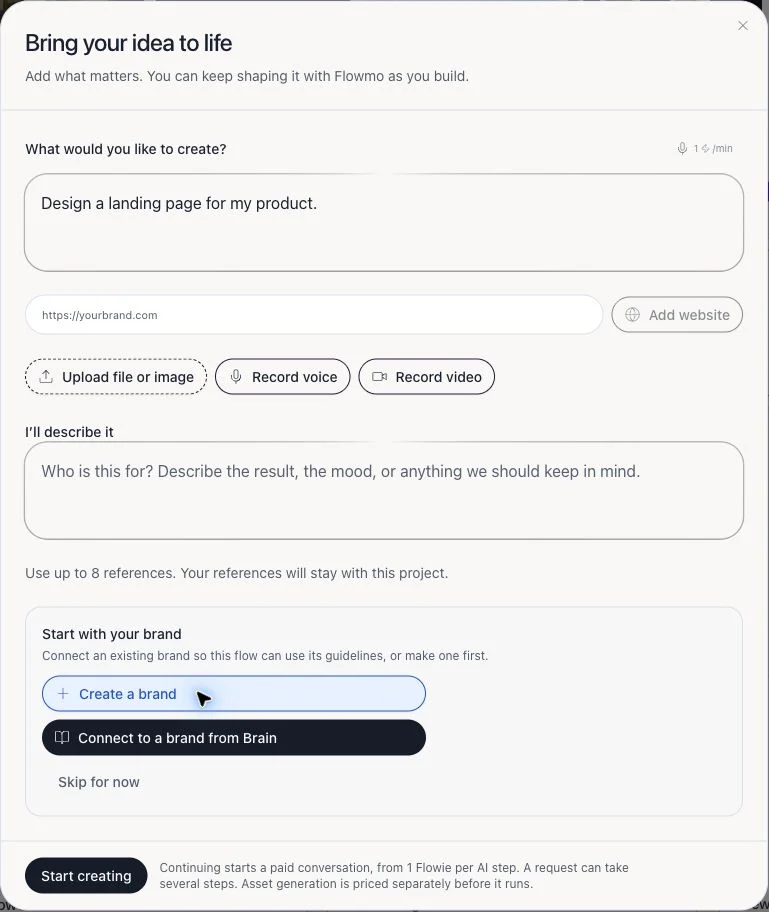
- In “Bring your idea to life,” refine the goal and attach a website, document, image, recording, or other context when relevant.
- Choose Create a brand, Connect to a brand from Brain, or Skip for now. If you draft a new Brand, review its evidence, edit unsupported fields, and save only when it accurately represents your identity.
- Check the brief, references, Brand choice, and displayed Agent cost before choosing Start creating. This begins a paid Agent conversation in a new Flowgen project.
- Inspect the Agent’s plan and canvas changes. Connect task wording through Text nodes and reusable identity through the linked Brand’s specific fields.
- Before generating an image, video, or other asset, inspect its separate model and Flowie quote. The Brand draft does not include asset generation.
- Later, reopen the Flowgen project from Dashboard to continue the saved task; reopen a saved Brand from Brain to revise its reusable context.
One path, optional context
- The Dashboard prompt starts from the desired result.
- Brand is optional: create, connect, or skip.
- The guided task opens in Flowgen, where Website, Video, Designer, and other editors can be connected as nodes.
- A separate standalone project is an advanced lifecycle choice, not the first onboarding decision.
What to review in a Brand draft
- Brand name and description; audience and positioning; tone, emotions, and writing rules; palette and typography; logo and visual references; design-system fields.
- A reference is evidence, not guaranteed truth. Keep source material and revise unsupported inferences before using Brand fields in downstream generation.
- After saving, link the intended Brand to each project that should use it; creating a Brand does not silently link it to every existing project.
Task continuity
- The guided Flowgen path stores the task with the created project so you can return to its Agent conversation.
- The Agent may ask for clarification or present a plan before acting. Review the target project and paid-action quote before approving work.
- Use the canvas to inspect connected nodes and data; use the Agent for guided orchestration.
Tips
- Use one or two representative references first, then correct the draft before adding a large library.
- For reusable brand voice, store rules in the Brand and connect its exact compatible field; keep task-specific instructions in a connected Text source.
- For a hands-on start without the guided Agent, open a blank Flowgen canvas and use its eight starts or Marketplace.
Limitations and important notes
- Welcome visibility and re-entry controls can change with onboarding experiments; follow the current Dashboard entry shown to your account.
- Brand and task drafts do not guarantee every reference can be read or every requested design can be generated.
- Flowie prices, model choices, and asset costs vary; always use the in-product quote for a paid action.
Troubleshooting
I dismissed the welcome and cannot find the guided path.
Return to Dashboard and choose “Describe what you have in mind” beneath “What would you like to make?”. Dismissing the welcome does not delete saved work.
The Brand draft missed or misread a reference.
Open the draft review, correct the affected fields, and remove unsupported claims. Add a clearer source or context before asking AI to revise it.
I expected a generated image/video but only got a Brand or task.
Brand drafting and task creation are separate from asset generation. Continue to an explicit generation action and review its Flowie quote/confirmation.
Related guides
- Getting started: describe what you want to make
- Three ways to start in Flowgen: chat, eight starts, or Marketplace
- Dashboard Brain and Assets: browse reusable knowledge and media
- Flowgen inputs: connect prompt nodes and the right Brand fields
- Brain Brand and Business records: fields, references, and project links