Understand automatic and manual backups for native compositor projects, and restore an earlier snapshot without sacrificing the work you have open now.
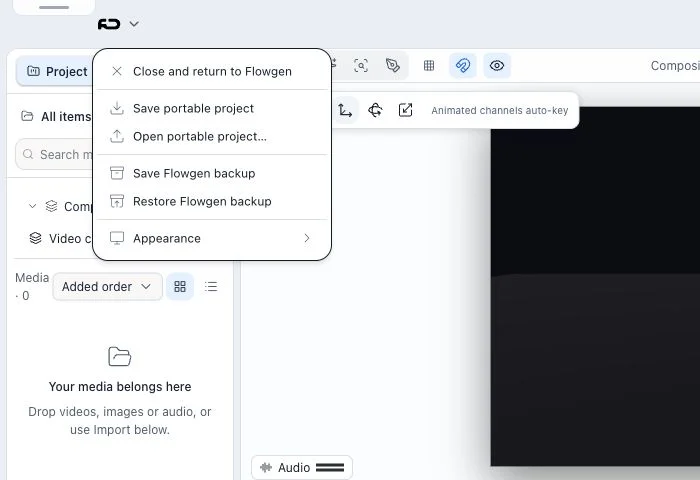
Where: Native Video Editor → project menu → Save Backup or Restore Backup.
Key ideas
- Backups are separate from autosave: The native compositor keeps recoverable project snapshots in its project backup area. Autosave/checkpointing, portable JSON export, Dashboard restore, and legacy Flowgen editor backups are separate mechanisms.
- Automatic snapshots are conditional: Automatic backups are created on the configured two-minute cadence only while the project is dirty and this session is the editable collaboration leader.
- Restore protects current edits first: Before applying a chosen snapshot, restore writes a Before restore safety copy of the current document. If that safety copy cannot be saved, restore is refused.
Steps
- Open the project menu and choose Restore Backup to view available snapshots, their timestamps, and whether each is Manual, Automatic, or Before restore.
- If no backups exist yet, make an edit and wait for an eligible automatic backup, or choose Save Backup to create a manual snapshot.
- Select the exact snapshot to restore. The current project is first saved as a Before restore backup, then the selected document is loaded.
- Verify the restored composition, timeline, media, and project identity before continuing. Use the newly created Before restore snapshot to return if you chose the wrong point.
- Use Save Backup before a risky edit or handoff when you want a named recovery point without waiting for the automatic interval.
Snapshot labels
- Automatic snapshots are produced by the native compositor’s dirty-state backup loop.
- Manual snapshots are created from Save Backup.
- Before restore snapshots are safety copies created immediately before a restore operation.
- The restore list also recognizes supported legacy manual snapshot names; it filters out unrelated editor backup files.
Collaboration and failure safety
- Automatic backup requires an editable leader session; read-only collaborators do not independently create competing automatic snapshots.
- A failed safety-backup write blocks restore so the current in-memory project is not knowingly overwritten without a recovery copy.
- This is a recovery feature, not a substitute for exporting a portable project when moving the project to another environment.
Tips
- Create a manual backup before a destructive restructure, then use automatic snapshots as an additional recovery layer.
Limitations and important notes
- Automatic backups require project changes and an eligible editable leader session.
- Backups are scoped to the native compositor project; do not assume Dashboard or a legacy Flowgen editor can restore them.