Keep a native Video Editor composition inside a Flowgen graph, connect layers/audio/compositions/mattes/design systems, edit in its own compositor surface, and choose whether the result remains node-backed or becomes a separate project.
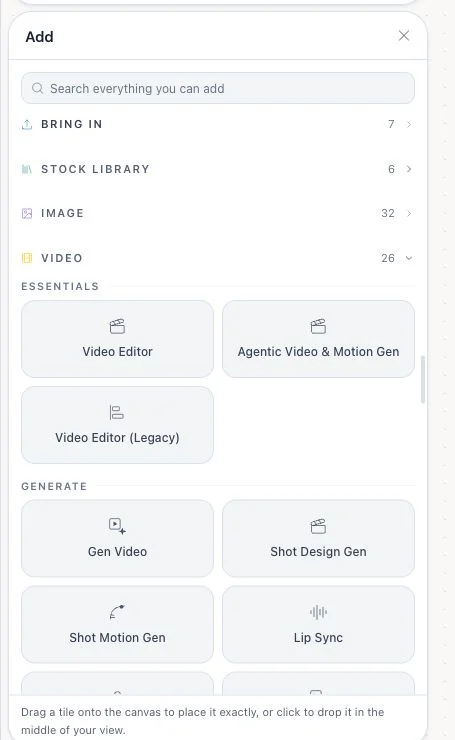
Where: Flowgen → empty canvas → Animation & motion or Reel & video edit; or Add → Video → Essentials → Video Editor.
Key ideas
- Video Editor is a native composition node: The node formerly called Video Compose now hosts the native timeline/compositor. It is not the legacy Konva quick editor and not the separate Agentic Video & Motion Gen iframe editor.
- Two blank-canvas starts create this node: Animation & motion and Reel & video edit each insert a videoCompose node into the current empty Flowgen canvas and open its editor. The suggested prompt is seeded as an editable AI-rail draft; it is not automatically submitted or charged as an AI turn.
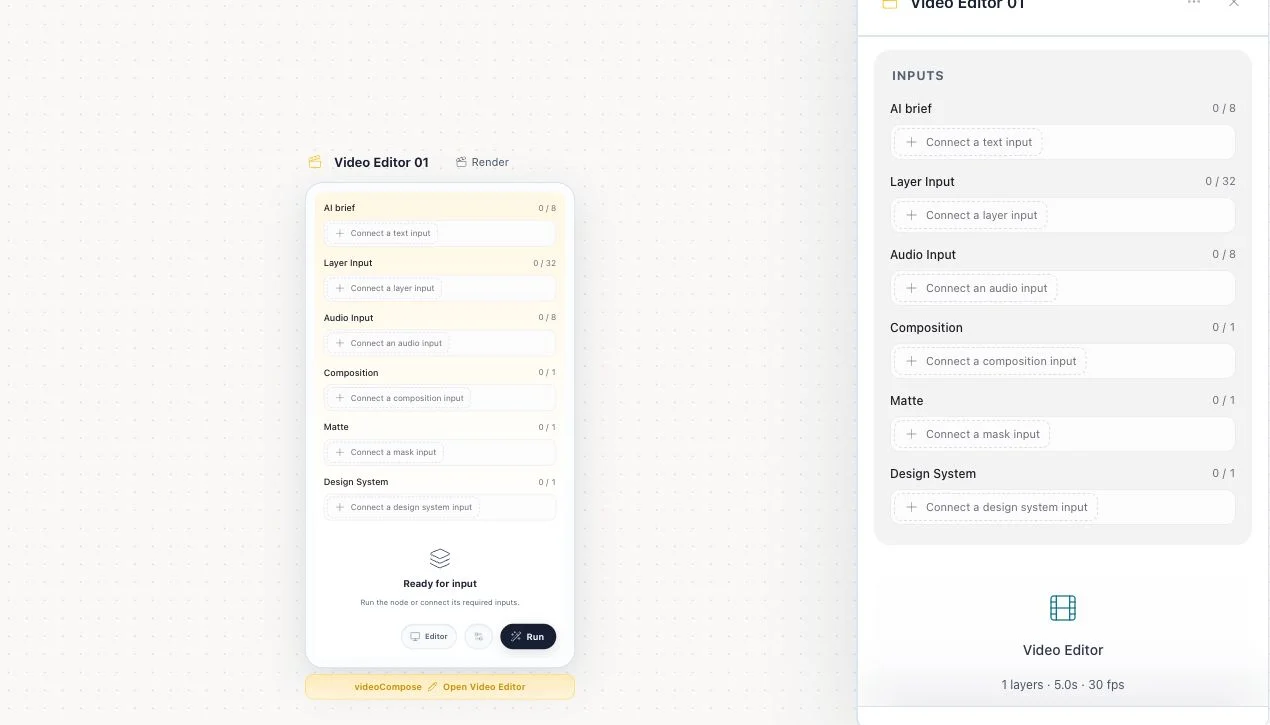
- AI brief is a connected text input, not a render input: The card exposes AI brief as text_in, accepting up to eight ordered Text or compatible Brand-field connections. The connected or card draft is handed into the compositor assistant when the editor opens; handoff fills its composer and does not by itself submit an AI turn. The node remains an editor, not a runnable generator.
- Editable and rendered outputs are distinct: composition_out carries the native editable composition to Video Render or Image Sequence. compose_out is the rendered-composition compatibility output used by composition consumers.
- Graph input and local draft can conflict: composition_in can replace the editable document. If upstream changes while a local editor draft is open, the node stops and asks whether to preserve/save or discard the draft instead of overwriting silently.
Steps
- On an empty Flowgen canvas, choose Animation & motion or Reel & video edit to insert and open this node with an editable, unsent draft brief. On an existing flow, use Add → Video → Essentials → Video Editor.
- For AI direction, connect a Text source or the exact compatible field of the linked project Brand to AI brief (text_in). Review the draft in the editor assistant and submit it only when ready.
- Wire visual layers to layer_in, audio to audio_in, an existing native composition to composition_in, an optional matte to matte_in, and a design system to design_system_in.
- If using matte_in, choose the Matte target visual layer on the card.
- Open video editor and author the edit/composite in the native same-window surface.
- When the card reports transient media, use Save media to project before reload, collaboration, or handoff.
- If an upstream composition changes during local edits, review the warning. Save/resolve the draft or choose Discard local draft and use upstream only when the upstream revision should win.
- Connect composition_out to Video Render composition_in or Image Sequence composition_in for delivery. Use compose_out only where a rendered-composition input is expected.
- Use the card Render video shortcut only when a downstream Video Render node is connected. Use the sidebar Open compositor action for editing, or Make this a project when promotion is available and a standalone composition is intended.
- For MCP, call flowgen_open_compositor, inspect returned live schemas, invoke read_compositor before a revision-safe write, then flowgen_close_compositor.
- Check the first-frame preview, layer count, dimensions/duration, warnings, render output, and reopenability after saving the flow.
The editor window and node are distinct
- The card and sidebar describe graph inputs and outputs; Open Video Editor opens the native compositor workspace.
- Use Detach editor for a floating editor window and Full screen editor to restore the expanded view when those controls are shown.
- The editor’s close/save controls return the edited composition to its owning node; resolve local-versus-upstream changes deliberately rather than discarding a newer edit.
- Make this a project promotes the composition to a separate dashboard project while preserving the originating node as the editing entry point.
Choose an output intentionally
- composition_out is the editable native composition and is the source for downstream Video Render or Image Sequence Output.
- compose_out is a rendered-composition compatibility output; use it only where a rendered result is expected.
- After editing, confirm the card’s first-frame preview, duration/FPS/layers, save status, and any upstream-conflict warning.
Tips
- For external MCP edits, open the native compositor lifecycle and read its live schema/readiness and current document identity before applying a mutation.
Limitations and important notes
- Video Editor itself is an editor, not a generation node; paid media operations inside AI still require their own authorization.
- Only one same-window compositor surface is exposed to MCP at a time.
- A card preview is the first frame, not proof of full playback.
Troubleshooting
MCP says document surface is unavailable.
Video Editor is not an iframe. Use flowgen_open_compositor and flowgen_invoke_compositor_tool.
The node refuses an upstream update.
A local draft diverged. Decide which revision should win and use the card’s conflict action deliberately.
A shared flow loses imported media after reload.
Open the card and use Save media to project until the transient-media warning clears.